Sign in to your account
Use an email verification code to access your account securely.
By continuing, you agree to our Terms of Service and Privacy Policy.
Several images in, one prompt set out
Select a small set of images and turn each one into an editable prompt. Review the results together, copy the set, or download a CSV with the file name, prompt, style, elements, and aspect ratio.
Batch complete
One-to-one, not one-to-many
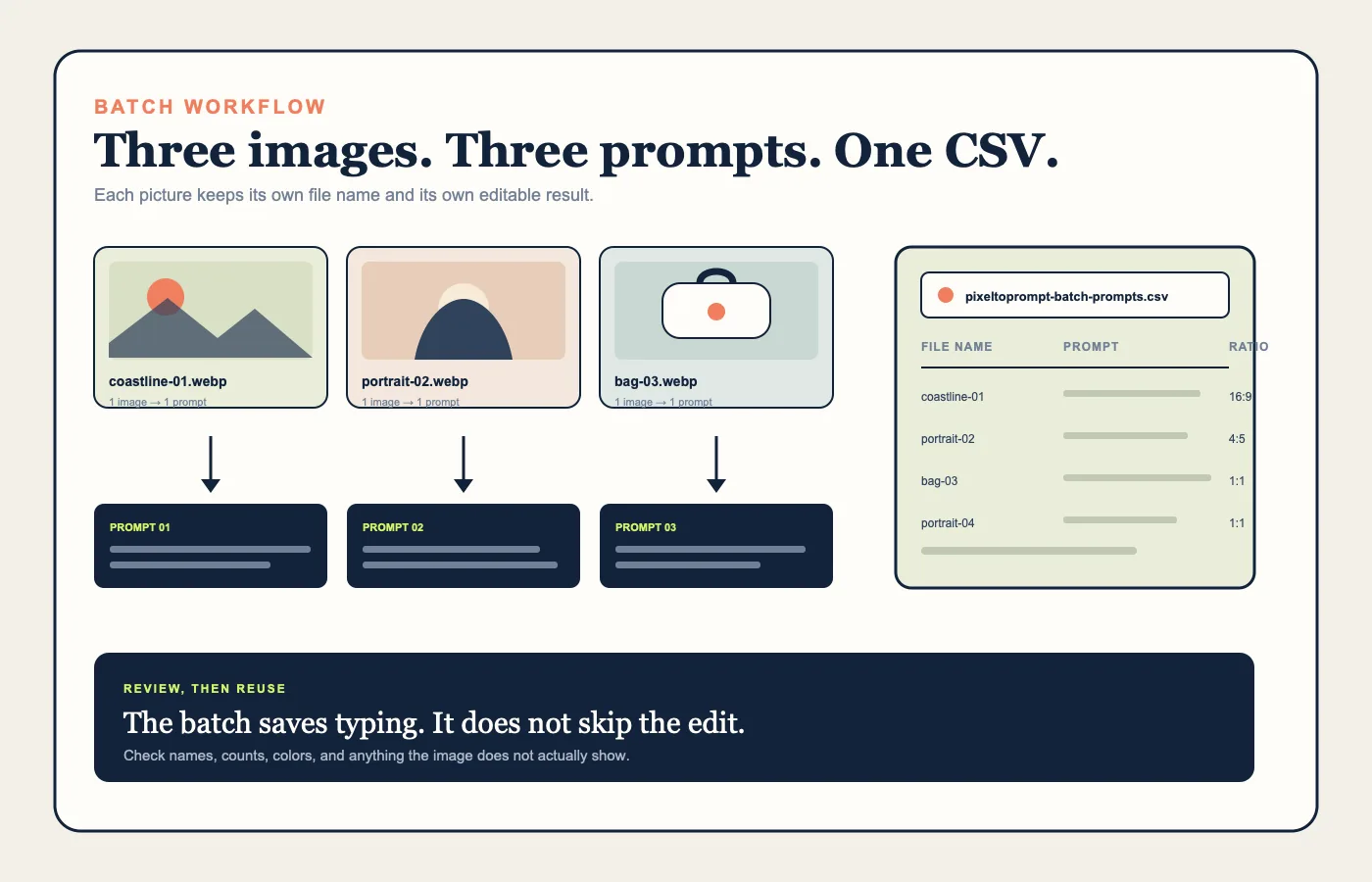
A batch is useful only when you can still tell which prompt belongs to which picture. This page keeps the original file name attached to every result and writes that pairing into the CSV. You can compare a product photo, a portrait, and an interior without losing the thread.
The batch does not blend the images or average their styles. Each request carries one image and the same settings, so the output remains a set of independent prompts you can edit or discard one by one.
Batch image to prompt means turning several pictures into prompts in one session, without repeating the same upload and settings steps for every file.
A normal image-to-prompt tool accepts one picture, reads its visible subject, setting, light, colors, materials, framing, and style, then returns a prompt. A batch workflow repeats that job across a small set of images. The important word is “repeats”: each image still gets its own request and its own result.
That makes the page useful for a folder of product shots, a moodboard export, a set of location references, or a collection of images you want to organize with searchable text. It is not a way to train a model, merge references, or create one shared style from several pictures. Those are different jobs.
The result is designed to be reviewed as a set, but every row still contains enough detail to use on its own.
The main text describes the image in concrete visual language and is ready to edit or paste into an image tool.
Short tags summarize the art direction and the main objects the model noticed, so you can scan the batch quickly.
The closest common ratio is recorded with the original file name, which keeps the prompt connected to its source image.
The CSV exports the same information in plain columns: file name, prompt, negative prompt when requested, style tags, main elements, aspect ratio, and whether the result came from demo mode. That makes the file easy to open in a spreadsheet, sort, or hand to someone else.
Keep the batch small enough to review. A short queue with clear settings is more useful than a large folder with mixed intent.
Select up to ten JPG, PNG, or WEBP images. Keep related images together so one setting makes sense for the whole batch.
Pick the model, detail level, and visual areas. Every image will be read with the same priorities.
Open each prompt, correct names or counts, then copy the set or download the CSV for your notes and production files.
Use a batch when the images belong to one project and you need a first written pass across all of them.
A small shop may have front, detail, and lifestyle photos for several products. A batch creates a written reference for each image, which is easier to search than a folder of file names.
When a moodboard arrives as separate images, prompts can expose the recurring palette, light, materials, and composition you actually respond to.
Use the same model and detail setting across a set, then edit the results into a house style instead of starting each prompt from a blank field.
The batch page is not automatically better. It is a convenience for a set, not a replacement for careful work on one image.
| Question | Batch Image to Prompt | Image to Prompt |
|---|---|---|
| Best input | A related set of several images. | One image that needs close attention. |
| Main advantage | One shared brief and a CSV export. | A focused result with more room for manual refinement. |
| Review style | Compare prompts as a set, then fix outliers. | Edit one prompt until the wording is right. |
| Where to start | Stay on this page and add your images. | Open Image to Prompt for a single reference. |
A prompt set is a first draft. The batch saves typing, not the final judgment.
Open the CSV and scan for the same problems you would check in a single prompt: invented names, wrong counts, a style word that does not belong, or a detail that is true in one image but not the next. Correct the file names if they are too generic, and remove rows that do not fit the set.
If one result is much shorter or much more generic than the others, run that image again on its own rather than editing around a weak first pass. A batch should make the review easier, not hide a bad result inside a long list.
Keep the CSV as a record of what was generated. If you paste prompts into another tool, leave the original file name in a nearby column so you can trace the output back to the image that produced it.
The page is a prompt-writing shortcut, not an image pipeline.
It does not generate images, train a custom model, identify people, verify a brand, or guarantee that a prompt will reproduce an image exactly. It also does not merge several references into a single style. Each result describes one image and can be edited independently.
Large batches are intentionally capped. Every image needs a separate request, and a queue that is too long is harder to review and more likely to hit rate limits. If you have a large archive, work in small groups that share a clear purpose.
Start with the format you already have: one image, a photo set, or a written idea.
How the queue works, what the export contains, and where the limits are.
Add up to ten images, keep one shared brief, and leave with editable text plus a CSV.
Start a batch