Sign in to your account
Use an email verification code to access your account securely.
By continuing, you agree to our Terms of Service and Privacy Policy.
A clip in, a shot plan out
Turn a video into a text prompt. Six frames are sampled in your browser, then read for action, camera, continuity, and style so you can copy an editable prompt for a text-to-video model.
Frames are decoded locally. Only a small six-frame contact sheet is sent for analysis; the video file is not uploaded.
Sequence read
A video to prompt generator turns moving footage into written direction that a text-to-video model can follow. This page focuses on the description step, not on generating a new clip.
Video is harder to describe than a still image because the important information is spread across time. A single frame can show the subject and the setting, but it cannot show whether the camera pushes in, whether the subject turns, or how the scene ends. A useful prompt has to account for that change. The video to prompt tool samples several moments from the clip so the written result can describe a sequence instead of a frozen picture.
The result is not a transcript and it is not an automatic edit decision list. It is a compact production brief: who or what is on screen, what happens, how the camera behaves, what stays consistent, and what visual language holds the shot together. That brief is useful when you want to recreate a look, test a shot idea, or explain a reference clip to another person.
This page is built for short reference clips. A six-frame sample can capture the broad shape of a shot, but it cannot preserve every gesture, cut, or line of dialogue. Treat the output as a strong first draft that you review against the original footage.
The browser reads the clip, takes six evenly spaced moments, and arranges them into one contact sheet for analysis.
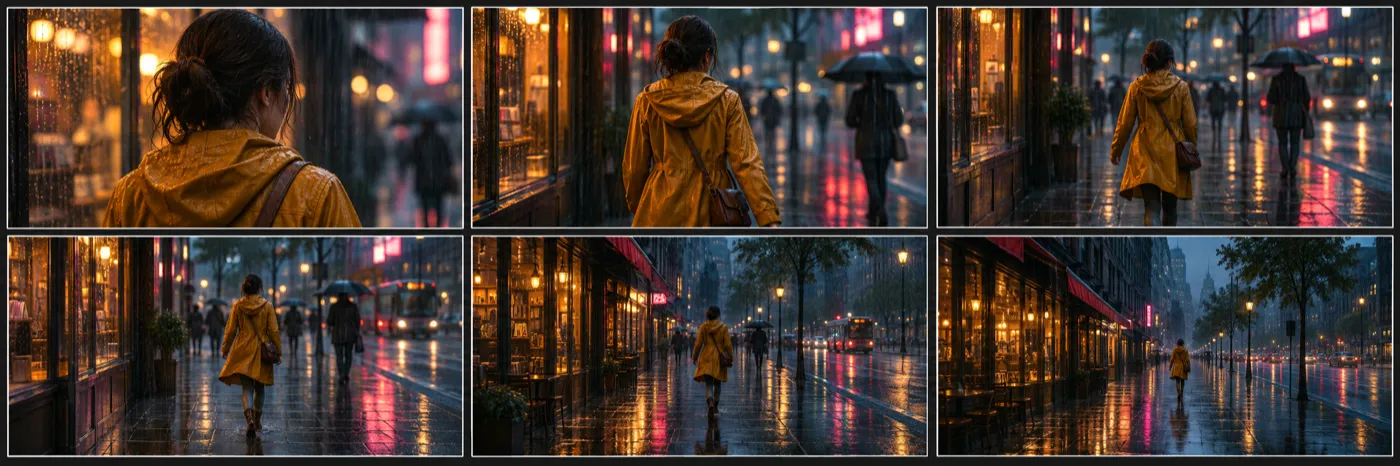
When you choose a video, the page loads it into a local video element and reads its duration. It then seeks to six points across the clip and draws each frame into a canvas. The frames are placed in a three-by-two grid, left to right and then top to bottom, so their order is unambiguous. That grid is compressed to a small JPEG and sent to the analysis endpoint. Your original video never leaves the browser.
This approach has a clear tradeoff. It is fast and private, and it works without a server-side video pipeline. It also means the model sees samples rather than continuous motion. A fast pan, a one-second reaction, or a cut between two nearby samples may be missed. The prompt instructions tell the model to describe only motion that is visible or strongly implied, but you should still compare the result with the clip.
The tool reads visible evidence, not metadata. It does not know the camera model, the lens, the frame rate, the location, or the names of the people in the clip. If those facts matter, add them in the optional direction field. Do not expect the result to invent a reliable production history from a few frames.
Start with a clip that contains one clear shot or one short sequence. A tighter reference produces a more useful description.
Use a shot with a visible subject and a clear beginning, middle, and end. Trim away long titles, dead air, or unrelated scenes before uploading.
Mention a detail the frames cannot prove, such as “one continuous take” or “handheld camera.” Leave the rest to the visual evidence.
Check the subject, action, camera, and ending against the footage. Edit anything the samples could not show before you paste the prompt into a video model.
A video prompt needs a clear subject, a readable change over time, and enough continuity to keep the shot from drifting.
Name the main subject, how many there are, what they are doing, and where the action starts. If a person is walking, turning, lifting, or speaking, say so plainly.
Describe the framing and the apparent movement: static wide shot, slow push-in, tracking follow, handheld drift, or a tilt. Use one primary camera behavior rather than several competing moves.
Say what must stay the same across the shot: wardrobe, weather, props, background, palette, and light direction. Then state where the action ends.
Name the quality and direction of light, the dominant colors, and whether the result should read as live action, animation, archival film, or another visual medium.
The frames show a person walking away through a wet street. The prompt adds the decisions that make the sequence directable.
A woman in a mustard hooded raincoat walks away from the camera along a city sidewalk at dusk. Shop windows glow warm amber, neon signs reflect in the wet pavement, and other pedestrians pass under umbrellas. The camera follows at a steady distance as the street opens toward a wider avenue.
It chooses one continuous following shot, keeps the rain and the blue-amber contrast consistent, and gives the walk a clear end point. Those choices turn a loose description into a shot that a video model can attempt.
The prompt does not claim to know the city, the lens, or the person. It describes only what the sampled frames support.
Editable prompt
A cinematic following shot at dusk on a rain-soaked city street: a woman in a mustard-yellow hooded raincoat walks away from the camera along a wet sidewalk, brown shoulder bag at her side, dark hair tied back. Warm amber shop windows and red neon reflections streak across the pavement, while other pedestrians pass under dark umbrellas. The camera tracks behind her at a steady walking pace, slightly handheld, keeping her centered in the lower middle of the frame. Rain falls continuously, the street gradually opens toward a wider avenue, and the shot ends as she continues walking into the blue evening distance. Muted teal shadows, amber highlights, realistic live-action film still, shallow depth of field, 16:9.
Both pages produce video direction. The difference is whether you start with motion or with a single still.
| Question | Video to Prompt | Image to Video Prompt |
|---|---|---|
| Starting point | A short video clip with visible motion. | One still image used as the opening frame. |
| What is analyzed | Six sampled moments across the shot. | The subject, setting, light, and style in one frame. |
| Best for | Recreating a shot, describing a reference clip, or building a shot list. | Animate a photo, illustration, or product image. |
| Where to start | Stay here and upload a clip. | Open Image to Video Prompt. |
The result is a written shot description, not a complete understanding of the clip.
Audio is not analyzed. Dialogue, music, voice-over, and sound effects do not influence the prompt. If sound is part of the idea, describe it in the optional direction field, and remember that many text-to-video models do not generate synchronized audio.
Fast motion and short cuts can disappear between samples. The model may describe a smooth continuation when the original clip contains a hard cut, or it may miss a brief gesture. Check the result against the footage before using it as a shot list. A longer clip is not automatically better; one clear shot is easier to read than a montage compressed into six frames.
This page does not generate, edit, upscale, or download a video. It produces prompt text only. It also cannot verify identity, location, rights, or factual claims. If the clip contains a real person, a branded product, or a protected location, confirm permission separately before you reproduce or publish anything based on it.
Choose the page that matches the material you already have.
What the tool reads, how the clip is handled, and where the finished prompt can be used.
Choose a short video, sample its key moments, and leave with an editable shot description.
Upload a video