Sign in to your account
Use an email verification code to access your account securely.
By continuing, you agree to our Terms of Service and Privacy Policy.
Keep the photo, direct the change
Turn a reference photo and a change request into an editable image-to-image prompt. The subject, framing, and visual facts are read from the photo, then rewritten as clear edit instructions.
Edit brief ready
Prompt ready - take it straight into the image generator.
This page writes the prompt, not the picture. Upload a reference image and describe the change. The result is text that you can paste into an image editor or img2img model. It does not render, mask, retouch, or save an edited image.
What a good edit keeps
An image-to-image prompt is most useful when it separates what must stay from what should change. The subject, count, pose, crop, and camera angle are anchors. The background, light, color, material, or style are the variables.
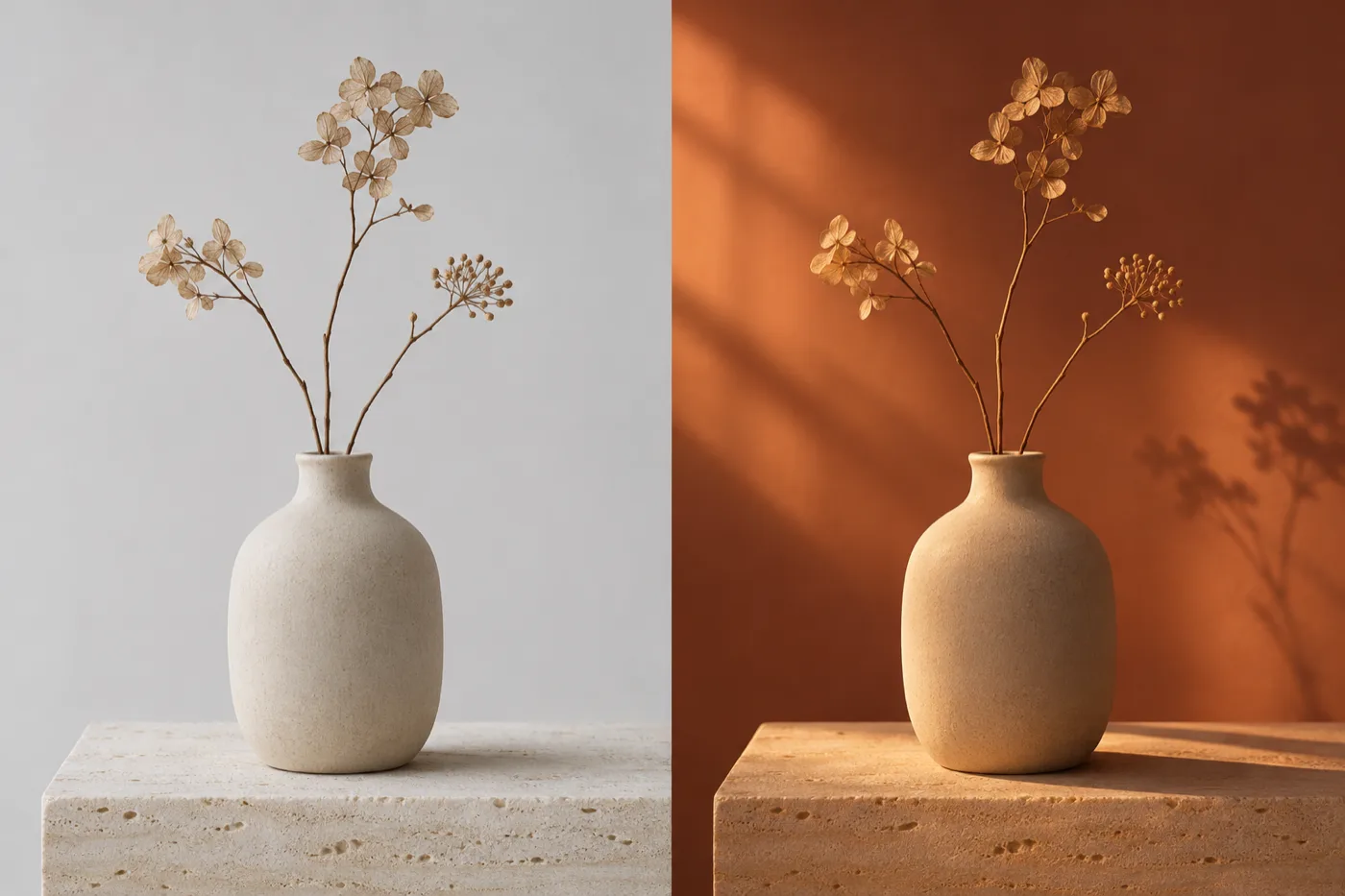
The example keeps the vase, branches, plinth, and camera position, then changes only the studio into a warm terracotta scene. That is easier to control than “make it look better.”
An image to image generator uses an existing picture as the starting point for a new result. This page handles the instruction-writing part of that workflow.
In a typical image-to-image workflow, you give a model a reference image and a change request. The model produces a new image that keeps some of the original and alters the rest. The hard part is usually not the click; it is deciding what should survive and what should change. A vague request lets the model make that decision for you. A clear image to image prompt makes the boundary visible before you spend credits or time.
This page reads the uploaded reference and writes an editable prompt for that kind of editor. It names the visible subject, the composition, the light, and the style that should stay, then states the requested change. The output is useful with models that accept a reference image plus a text instruction, and it can also serve as a brief for a human retoucher.
The image supplies the visual facts. Your sentence supplies the intent. The prompt joins them without pretending the edit has happened.
When you upload a JPG, PNG, or WEBP image, the tool reads the visible subject and how many there are, the pose or arrangement, the crop, the camera angle, the background, the light direction, the palette, and the materials it can identify. It does not read EXIF, location, names, or the history of the file. If a fact is not visible, it should not appear in the result.
Your written request is treated as the change instruction. “Make the wall warmer” is a usable direction. “Make it better” is not, because it does not say which decision should move. If you want the subject untouched, say so. If you want a new background, name the kind of place, the light, and the mood you have in mind.
The output is one copy-ready prompt with a short style list and visible elements. It is not a rendered file, a mask, or a guarantee that an editor will follow every clause.
Start with a reference that already has the right subject and framing. Then describe only the part you want to move.
Use an image where the subject is visible and the crop is close to what you want. A blurred or crowded source gives the model less to preserve.
Say what should change and, when it matters, what must stay. One or two clear changes are easier to control than a full redesign.
Review the prompt for the subject, count, pose, framing, and background. Remove any invented detail, then paste it into your editing model.
A strong edit prompt is a small contract: these facts stay, this fact changes, and this is what the result should look like.
Name the main subject, how many there are, and the visual facts that matter: pose, expression, wardrobe, product shape, color, and position in the frame.
State one clear edit: replace the background, change a material, relight the scene, shift the palette, or move the style. Avoid several unrelated changes in one pass.
Keep the framing, angle, lens, and depth of field when the composition should survive. If the edit needs a new crop, say so instead of leaving it to chance.
Describe the direction, quality, and color of the new light, plus any shadow or weather change. These choices usually affect the result more than a list of style adjectives.
The reference already has the object and the composition. The edit changes the room around it.
A matte cream ceramic vase with a narrow neck sits on a pale travertine plinth. Three dried hydrangea branches rise from the vase. The background is a plain light-gray studio wall, lit evenly from the front left. The camera is level with the middle of the vase, and the whole object is in focus.
Keep the vase, branches, plinth, camera, and crop. Replace the gray wall with a deep terracotta backdrop and move the light to a low, warm sunset from the right. Add long diagonal shadows on the wall, warm the ceramic slightly, and keep the scene calm and premium.
Editable prompt
Image-to-image edit: keep the matte cream ceramic vase, its narrow neck, the three dried hydrangea branches, and the pale travertine plinth exactly as they are. Preserve the current camera height, straight-on angle, object scale, and centered crop. Replace only the plain light-gray studio wall with a deep terracotta backdrop. Change the lighting to a low warm sunset entering from the right, casting long soft diagonal shadows across the wall and a gentle amber edge on the right side of the vase. Keep the left side in soft neutral shadow so the form stays readable. Warm the overall palette to sand, rust, and cream; keep the dried flowers natural; maintain realistic product photography, a calm premium mood, and the same shallow background softness. Do not add props, people, text, or a new composition.
Both pages start with an uploaded image. One writes a change instruction; the other describes what is already visible.
| Question | Image to Image | Image to Prompt |
|---|---|---|
| Input | A reference image plus a change request. | A reference image only. |
| Output | An edit instruction for an img2img model. | A prompt that recreates or describes the image. |
| Best for | Background swaps, relighting, material changes, and style edits. | Understanding a reference or rebuilding a similar picture. |
| Where to start | Stay here and describe the change. | Open Image to Prompt. |
The prompt can describe an edit precisely. It cannot guarantee that an editor will preserve identity, text, or fine detail.
This page does not render an image, create a mask, remove a background, upscale a file, or save an edited copy. It does not know which editor you will use, whether that editor supports reference images, or how strongly it follows a text instruction. Check those capabilities in the tool you choose.
Image editors often drift on faces, hands, small text, logos, and repeated patterns. A prompt can ask for those details to stay fixed, but it cannot enforce pixel accuracy. For a product catalog or a regulated claim, use a controlled workflow with human review.
The tool also cannot verify rights. A reference photo may contain a person, a brand, or a location you do not have permission to alter. Confirm the license and intended use separately.
Choose the page that matches the material you already have.
What the page produces, what it can preserve, and where the actual edit happens.
Upload the image, name the change, and leave with instructions you can review before you generate.
Upload a reference image