Sign in to your account
Use an email verification code to access your account securely.
By continuing, you agree to our Terms of Service and Privacy Policy.
PixelToPrompt tool
Describe the idea once, pick the format, and get a copy-ready text-to-video prompt with timed shots you can paste straight into an AI video tool.
What it does
A video prompt generator turns a short idea into a text to video prompt that describes motion, framing, light, and pacing for an AI video model.
A still-image prompt describes a moment. A video prompt has to describe how that moment changes. The subject may move, the camera may travel, a new object may enter the frame, or the light may shift. Without that progression, many models produce a beautiful but static shot.
This video prompt generator takes the idea, video type, duration, platform, frame shape, and visual style, then returns a generation prompt plus timed shots. Use the result as a working draft: read the motion, cut an action that does not fit the duration, and add any creative direction the model cannot infer.
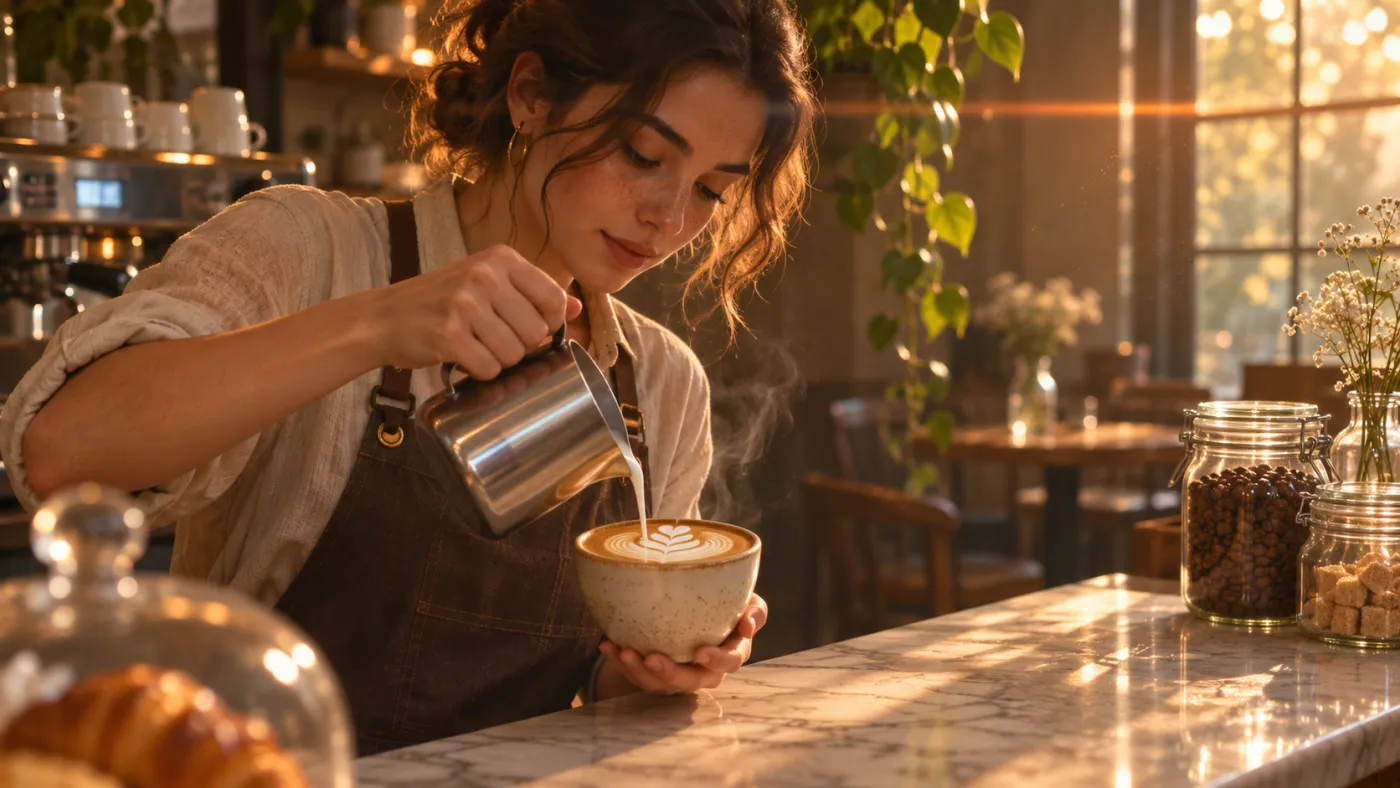
15-second cafe promptA quiet morning cafe in warm window light. A barista pours latte art into a ceramic cup on a marble counter while steam rises past the cup; the camera slowly pushes in from a medium shot to a close-up as the cup is set down. Calm natural motion, shallow depth of field, amber and cream palette, soft film grain, 16:9 landscape composition.
Prompt anatomy
Use these six parts as a checklist. A prompt does not need every line, but it should make the shot, movement, and visual treatment clear.
Who or what is in the shot, and what changes during the clip. One clear action is usually stronger than three competing actions.
Framing and one dominant camera behavior: locked-off, slow push-in, tracking shot, orbit, or handheld follow.
Time of day, light direction, contrast, color temperature, and the dominant colors or textures that hold the look together.
How the scene progresses from beginning to end. Name the movement and describe the starting and ending state when it matters.
A four-second clip cannot hold a full story. Match the number of actions and shots to the time available.
Write for the final shape: vertical, landscape, or square. Keep essential action away from the edges when the crop is tight.
Workflow
Work from one observable idea. Add only the details that help a model understand what happens on screen.
Start with one subject doing one thing in one place. “A baker scores a loaf” is easier to direct than “a bakery commercial with warmth and craft.”
Choose duration before adding beats. A 4–8 second clip needs one action. A 15–30 second clip can carry several timed shots.
Describe subject motion and one camera move. Keep the camera instruction subordinate to what the viewer needs to see.
Remove secondary characters, extra locations, and unrelated actions. Use the remaining space for timing, light, and visual continuity.
Before generating
A fast check catches most prompt problems before they become a bad clip.
Fix the output
If the first generation drifts, change one variable at a time. The prompt is easier to debug than the model.
Add an action that changes the scene and one camera movement. Describe the starting and ending frame.
Give the clip more duration, remove a secondary beat, or reduce the number of changes inside the shot.
Keep one dominant move. Remove “orbit,” “handheld,” and “push-in” from the same sentence.
Reduce the number of people or objects, lock their description, and avoid asking for rapid transformations.
Write a centered vertical composition and keep the main action away from the outer edges.
Keep one palette, one lighting direction, and one visual reference. Remove contradictory style words.
More tools
Need a static prompt or a plain-language description instead? Start from the output you need.
Questions
What the tool does, what it does not generate, and how to make the prompt more usable.
It turns a video idea into structured text that describes the subject, action, camera, lighting, timing, and visual style for a text-to-video model.
This tool generates the prompt and timed shot list. You can then copy that text into a text-to-video tool, or use the continue button when a compatible video service is configured.
Start with one visible action, then add one camera behavior, a clear setting, light and palette, a duration, and the final frame shape. Keep early prompts short enough to test.
As long as the duration can support. A short clip usually needs one action and one camera move. Longer clips can carry several timed shots, but each should have a clear beginning and end.
Yes, when the model or workflow supports shot changes. Use the timed shot list to separate beats, and avoid asking one shot to contain several unrelated actions at once.
The form includes presets for TikTok, YouTube Shorts, Instagram Reels, Xiaohongshu, WeChat Channels, and landscape YouTube. The prompt uses the selected frame shape and pacing.
Yes. The generated prompt and shot list are editable text. Change the wording, remove shots, or add creative direction before copying.
Text-to-video models interpret motion and timing differently. Reduce competing actions, use one dominant camera move, and test with a shorter duration before adding more detail.
The tool is free to use on this page. You do not need an account or payment details before generating a prompt.
Use Image to Prompt or Photo to Prompt when you need a static image prompt. Use Video Prompt when the result must include motion, shot progression, camera movement, or a timed sequence.
Describe the scene once, choose the platform and duration, then edit the timed shots until the motion is clear.
Build a video prompt