Sign in to your account
Use an email verification code to access your account securely.
By continuing, you agree to our Terms of Service and Privacy Policy.
Start with a sentence, leave with a visual brief
Turn a written idea into a detailed text to image prompt. Describe the subject, setting, light, composition, and style, then copy the editable result into an image model.
Prompt ready
Prompt ready - take it straight into the image generator.
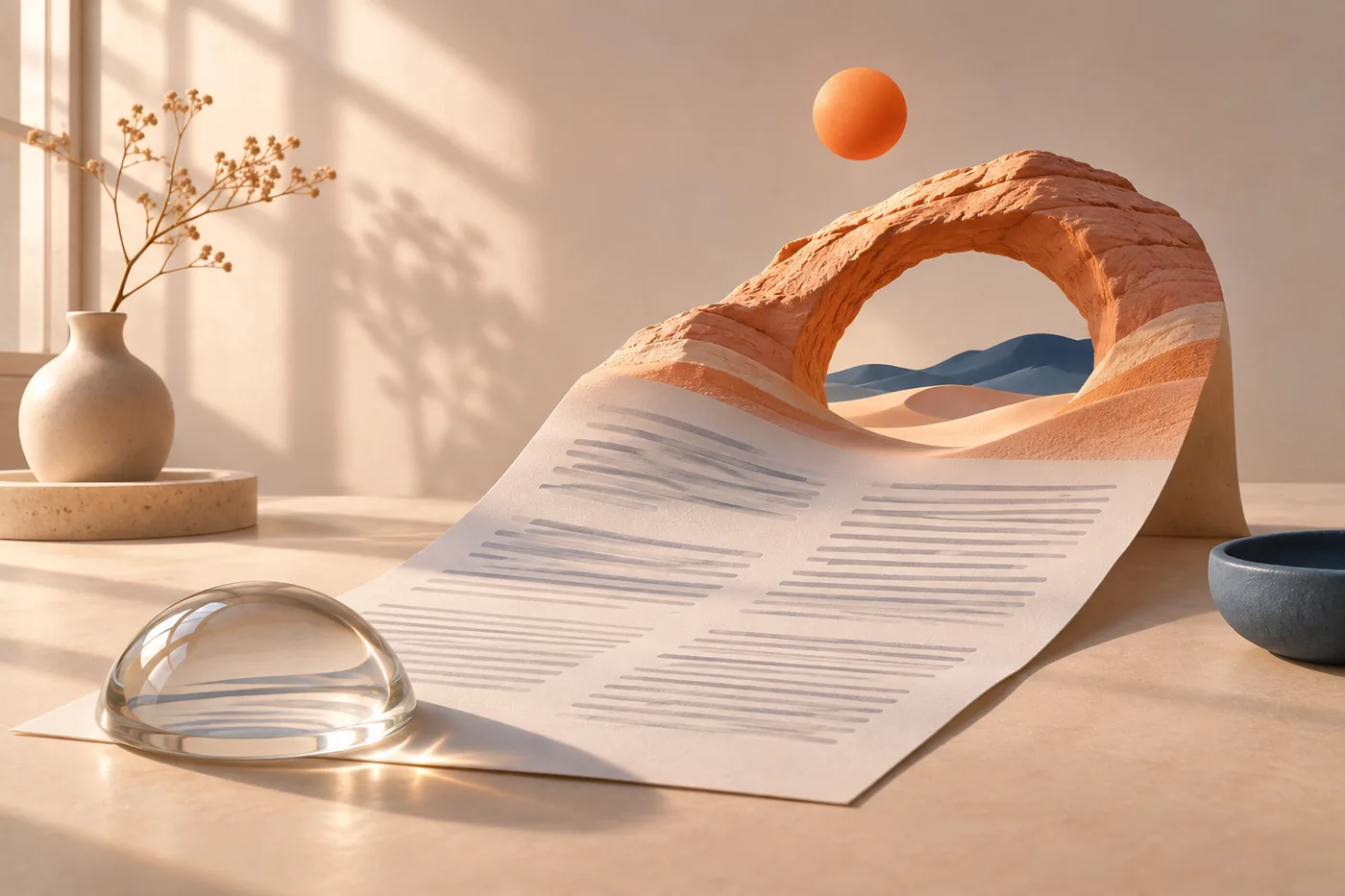
Text becomes a visual brief
The generator does not create the picture on this page. It shapes your sentence into a prompt you can take to a text to image model, with the subject, setting, light, composition, and style stated clearly enough to evaluate.
The example beside this text began with a short idea about paper turning into a landscape. The prompt named the fold, the arch, the floating sun, the tabletop, the light direction, and the palette. Those choices are what turn a pleasant idea into a usable direction.
A text to image generator turns written language into an image instruction. On this page, the output is the instruction itself: an editable prompt you can review before you generate anything.
A prompt is not a magic switch. It is a compact art direction document. The model needs to know what is in the frame, how the frame is organized, where the light comes from, and what visual language should hold the scene together. When those decisions are missing, the model fills the gaps with its own defaults. Use the text to image prompt builder above to make those choices explicit.
This tool is useful when you have the idea but not the words. You might know that you want “a calm image for a finance article” or “a strange product photo with a desert feel,” but not yet know which details will make that idea visible. The generator expands the sentence into choices you can accept, reject, or rewrite.
It is also useful when a prompt has become crowded. Paste a rough prompt and add a direction such as “simplify the composition” or “make the light softer.” The result gives you a cleaner version to compare, not a guarantee that any model will render it correctly.
A strong prompt is specific without becoming a checklist. Start with the decisions that change the picture most.
Name the main thing in the frame and what it is doing. If the scene has people, say how many and what the viewer should notice about them.
Place the subject in a real environment, then choose the crop, angle, depth, and amount of empty space around it.
Describe the direction and quality of light, the dominant palette, and whether the image should read as a photo, illustration, film still, or another medium.
Write the scene in plain language first. The tool can organize it, but it cannot know which detail matters most to you.
Use one or two sentences: who or what is in the image, where it is, and what is happening. Add a mood only when it changes the visual choice.
Choose the target model and detail level. Select the areas the prompt should emphasize, such as composition, lighting, colors, or background.
Check the result for invented details, repeated phrases, or a composition you did not ask for. Edit the prompt, then paste it into your image model.
The first sentence is enough to start. The finished prompt is where the visual decisions become visible.
“A strange still life about an idea turning into a place, warm light, design magazine feel.”
It chooses a paper sheet as the subject, a desert arch as the transformation, and a glass paperweight as the visual anchor. It also sets the tabletop, the direction of the morning light, the peach and ink-blue palette, the shallow depth of field, and the 3:2 frame.
None of those additions is a secret formula. They are decisions that make the image easier to judge. If one is wrong, edit it before you generate.
Editable prompt
Editorial surreal still life on a warm cream tabletop: a folded sheet of white paper with abstract gray paragraph lines curves upward into a miniature sandstone desert arch, a small matte orange sun floats above it, and a clear glass paperweight holds the near edge flat. Soft directional morning window light from the left, long gentle shadows, peach, sand, ink-blue and cream palette, shallow depth of field, premium design magazine photography, precise minimal set styling, 3:2 composition.
Use the prompt as a thinking tool before you spend time generating variations.
Turn a rough campaign, article, or product idea into a visual brief. Compare directions on paper before you commit to a long image workflow.
Write one clear direction for subject, light, palette, and composition, then reuse the stable phrases across a set of images while changing only the scene.
Paste a prompt that feels vague or overloaded. The result can separate the main subject from secondary style words and give you a cleaner starting point.
Both pages produce editable prompt text. The difference is the kind of input you already have.
| Question | Text to Image Generator | Image Prompt Generator |
|---|---|---|
| Starting point | A sentence about the image you want. | A written idea or a rough image prompt. |
| Main job | Build a complete visual brief for a text to image model. | Expand or rewrite an existing image idea. |
| Best for | First drafts, concept testing, and prompt cleanup. | General prompt writing and art direction. |
| Where to start | Stay here and describe the scene. | Open Image Prompt Generator. |
The result is a useful written direction, not proof of a finished image.
This page does not render the image, upscale a file, remove a background, or edit an existing picture. It generates prompt text for another tool. The output can still contain a detail that is wrong for your project, so review names, numbers, text, brand references, and claims before use.
If a result misses, put the most important subject and action in the opening sentence, remove style words that compete with each other, and compare the prompt in the model you actually plan to use. Exact text, small logos, and precise counts remain unreliable and need a person to check them.
Image models are not reliable fact sources. A prompt can describe a plausible scene, but that does not make the scene true or the result legally usable. If the image needs a real person, product, location, or trademark, verify the rights and accuracy separately.
Choose the page that matches the material you already have.
What the page produces, how to write a useful starting sentence, and where the image is actually generated.
Describe the scene, choose the visual priorities, and leave with editable text to image prompt wording.
Write a text to image prompt